AI photo editing is evolving rapidly, and viral “Dhurandhar-style” edits are trending across Instagram and Reels. One of the most popular concepts is recreating a cinematic pose inspired by Ranveer Singh—where a strong personality stands beside you in a desert-style background.
DHURANDHAR GEMINI AI PROMPT (RANVEER SINGH STYLE)
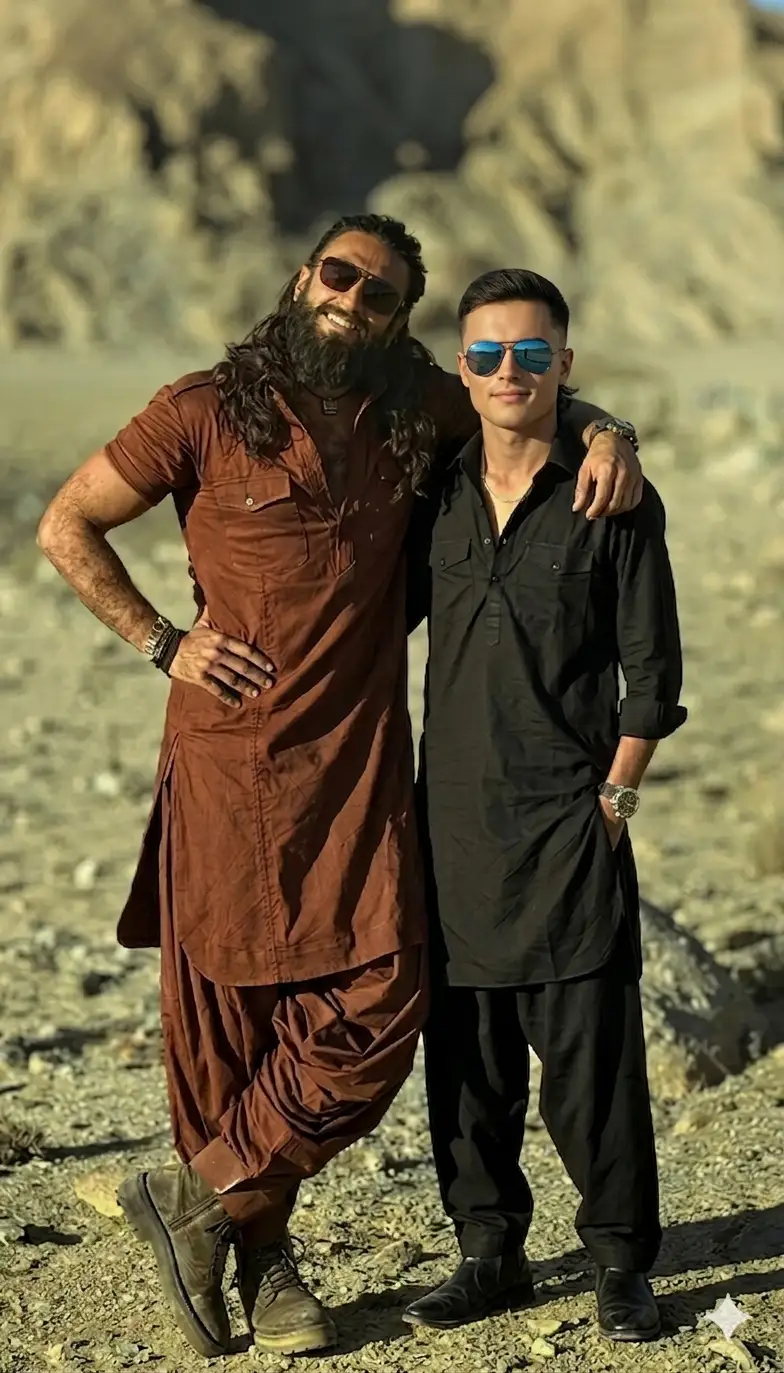
Ultra-realistic photo edit. Keep the man on the LEFT exactly unchanged (same pose, clothing, sunglasses, lighting, and desert background).
Remove the person on the RIGHT and replace him with the uploaded subject (reference photo). The new person must stand in the exact same position, same posture, and relaxed pose with the arm naturally around the shoulder.
Face & Identity:
Match the face exactly with the uploaded reference image. Preserve facial structure, skin tone, expression, and identity. Ensure perfect face blending and realism so the person is clearly recognizable.
ONLY change the outfit of the person on the RIGHT:
Replace his clothing with:
[INSERT OUTFIT HERE]
Ensure the new outfit fits naturally on the body with realistic fabric folds, shadows, and lighting matching the environment.
Environment:
Keep the same desert background, mountains, sunlight direction, shadows, and warm golden tone.
Quality:
Photorealistic, ultra-detailed fabric texture, cinematic lighting, HDR, sharp focus, 8K resolution, seamless blending, no distortion.
Outfit Ideas (Replace line with these)
1. 🖤 Modern Street Style
a black oversized t-shirt, ripped slim-fit jeans, white sneakers, and a silver chain
2. 🤵 Formal Look
a tailored black suit with a white shirt, no tie, slim-fit trousers, and polished black shoes
3. 🏖 Casual Summer
a light linen shirt (half-sleeve, beige), white chinos, and casual loafers
4. 🧥 Winter Fashion
a long black trench coat, high-neck sweater, fitted pants, and leather boots
5. 👑 Ethnic Premium Look
a cream sherwani with subtle embroidery, churidar pants, and traditional mojari shoes
Optional Parameters (Midjourney / SDXL)
–ar 3:4 –q 2 –style raw –v 6
HOW TO USE IN GOOGLE GEMINI AI
Step-by-step:
- Open Google Gemini AI
- Add your reference face (if replacing)
- Upload your base image
- Paste the Dhurandhar prompt
- Adjust outfit line if needed
- Generate and refine
Similar Prompts


1 thought on “Dhurandhar Gemini AI Prompt with Ranveer Singh”